πŸ›°οΈZafer SatΔ±lmış - Aviora

AppProtocolOrionTLV β€” Binary TLV

Frames use flat TLV fields between $ … #, with a structure close to the same tag family as Metallix, but every packet carries a transaction id in 0x00FF TRANS_NUMBER. Incoming TCP data is handled through a queue instead of a single buffer; sessions are correlated by transNumber.

Binary TLV TRANS_NUMBER 0x00FF Push + Pull Session + dispatch

Message packet format

A packet starts with $ (0x24), contains one or more TLV fields, and ends with # (0x23). TLVs are not nested.

$0x24
TAG2 bytes
LEN2 bytes
VALUELEN bytes
TAG2 bytes
LEN2 bytes
VALUELEN bytes
…
#0x23
Reply messages must include the same TRANSACTION NUMBER; otherwise the reply will not be processed correctly.

Data types and sizes

TypeSizeDescription
StringNRaw ASCII, no null terminator
Bool10x01 true, 0x00 false
uint8 / uint16 / uint321 / 2 / 4Big-endian

Session Model And Main Loop

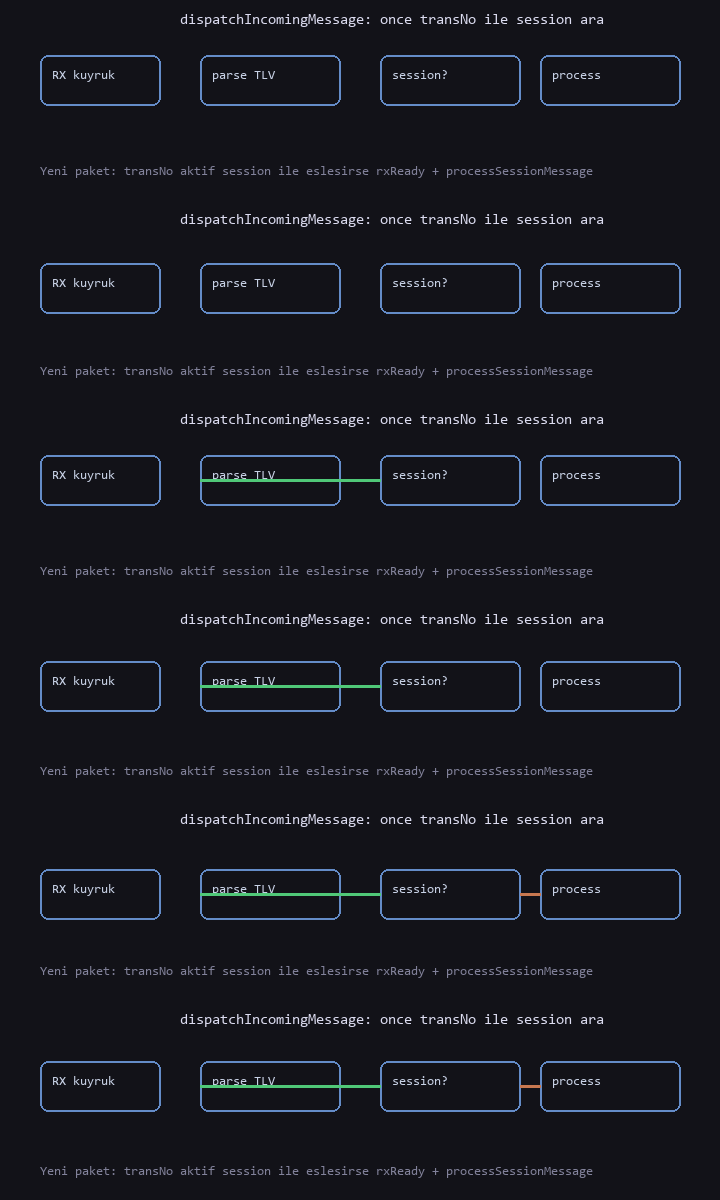
Each operation runs in a session; the session id is derived from TRANS_NUMBER in the incoming packet. Subsequent packets with the same id are handled for that session, so the device can manage multiple sessions concurrently. For example, one session may be driven over the pull connection while another runs on the push connection at the same time.

Protocol Task
flowchart LR
  subgraph Loop["protocolTaskFunc ~100ms"]
    Q[RX queue β†’ dispatchIncomingMessage]
    E[Event queue]
    A[All sessions β†’ processSessionMessage]
    F[sendIdent / sendAlive flags]
  end
  Q --> A
  E --> A
  A --> F
              
Incoming Packet Handling
flowchart TD
  R[Raw bytes] --> P[Read FUNCTION + TRANS_NUMBER]
  P --> H{transNum != 0 and active session?}
  H -->|yes| S[sessionSetIncoming + processSessionMessage]
  H -->|no| N[sessionCreate + processSessionMessage]
              

TAG Table

TAGNameTypeNotes
0x00XX β€” Common
0x00FFTRANS_NUMBERuint16Session / reply correlation (required in Orion)
0x0001FLAGstringe.g. "AVI"
0x0002SERIAL_NUMBERstringDevice serial number
0x0003FUNCTIONuint8Message type
0x01XX β€” Ident / Alive
0x0101REGISTEREDboolDevice β†’ server (ident)
0x0102–0x0104BRAND, MODEL, DATEstring
0x0105, 0x0106PULL_IP, PULL_PORTstring / uint16Pull listener address
0x0107REGISTERboolServer β†’ device (ident reply)
0x02XX β€” Streaming
0x0201PACKET_NUMuint16Chunk sequence
0x0202PACKET_STREAMboolMore chunks follow
0x03XX β€” ACK
0x0301ACK_STATUSbool
0x04XX β€” Log
0x0401LOG_DATAstring
0x05XX β€” Meter (SETTING)
0x0501–0x050BMETER_*variousSame meaning as Metallix
0x06XX β€” Server
0x0601, 0x0602SERVER_IP, SERVER_PORTstring / uint16
0x07XX β€” Readout / profile
0x0701, 0x0702METER_ID, READOUT_DATAstringPush data chunks
0x0703–0x0705DIRECTIVE_NAME, START_DATE, END_DATEstringPull requests
0x08XX β€” Directive
0x0801, 0x0802DIRECTIVE_ID, DIRECTIVE_DATAstring
0x09XX β€” Firmware
0x0901FW_ADDRESSstringFTP URL
0x0AXX β€” Error
0x0A01ERROR_CODEint16

FUNCTION Codes

ValueNameDirectionDescription
0x01IDENTPushUsed on first connection for the device to register with the server.
0x02ALIVEPushHeartbeat to indicate the device is alive.
0x03ACKBothIn-session / reply acknowledgment.
0x04NACKBothNegative acknowledgment on error.
0x05LOGPull requestSystem log request.
0x06SETTINGPullServer / meter configuration.
0x07FW_UPDATEPullFirmware update trigger.
0x08READOUTPull + pushMeter readout request + data delivery.
0x09LOADPROFILEPull + pushLoad profile request + data delivery.
0x0ADIRECTIVE_LISTPullList stored directives.
0x0BDIRECTIVE_ADDPullAdd a new directive.
0x0CDIRECTIVE_DELPullDelete a directive.

Packet Flow Animations

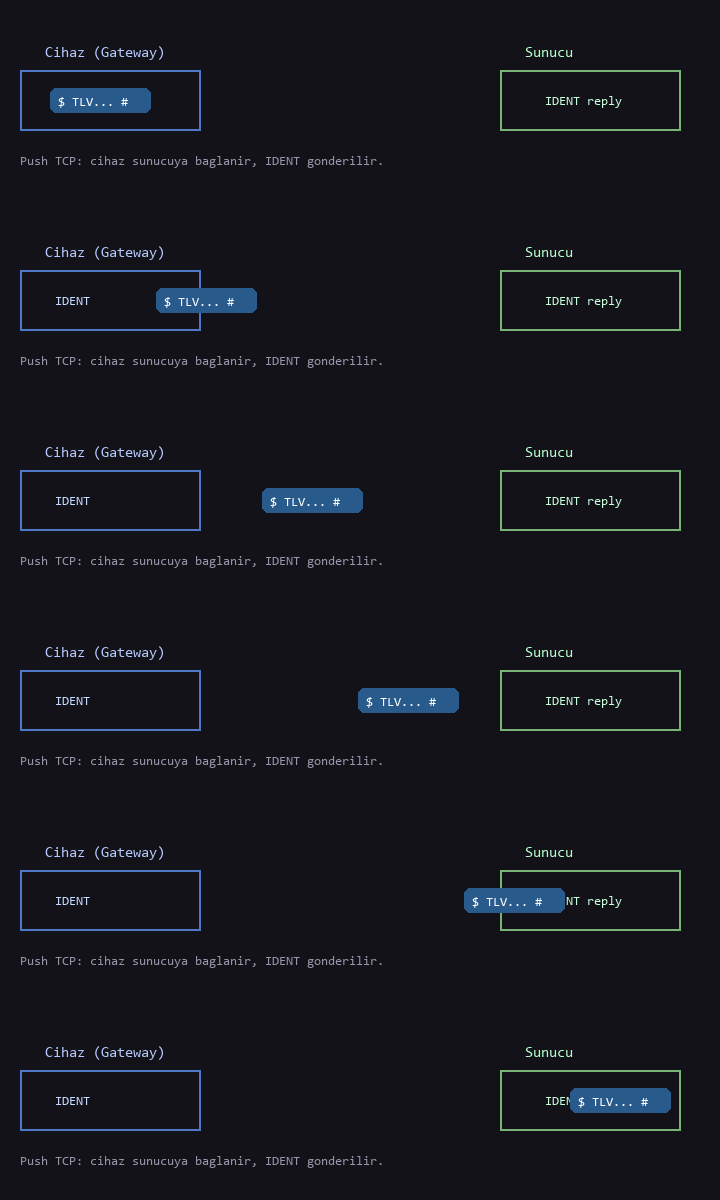
IDENT
IDENT push: device β†’ server, reply on the same channel
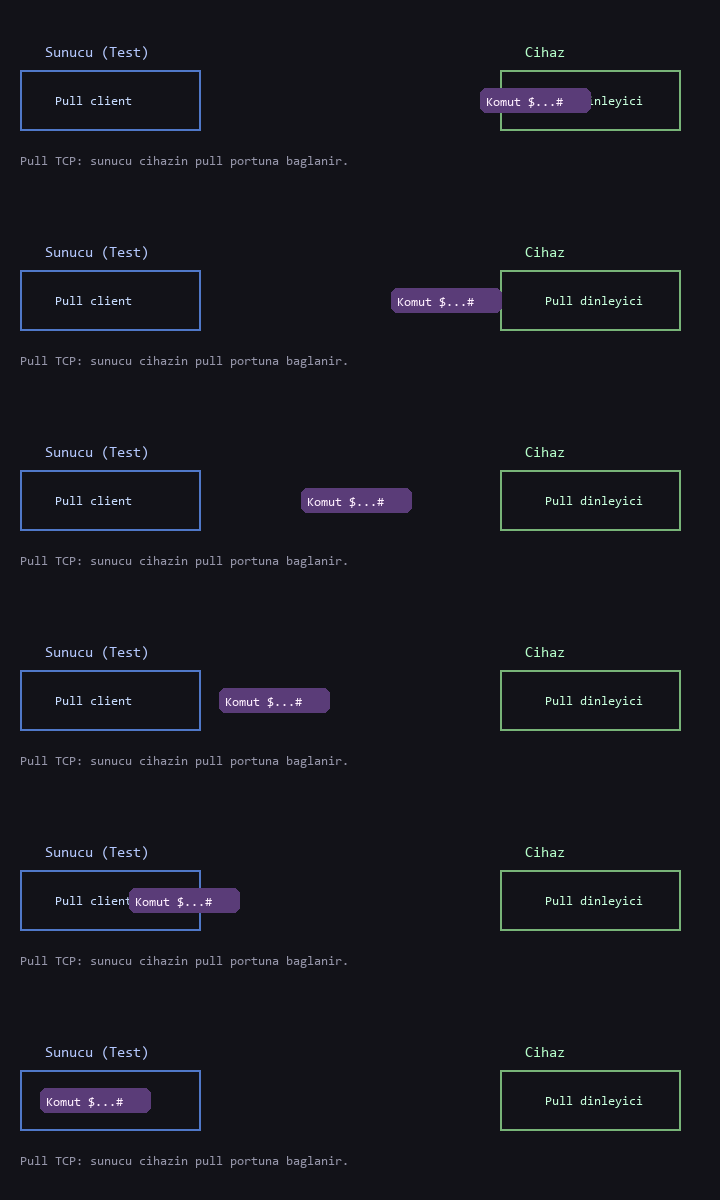
Pull
Pull: server acts as TCP client to the device pull port
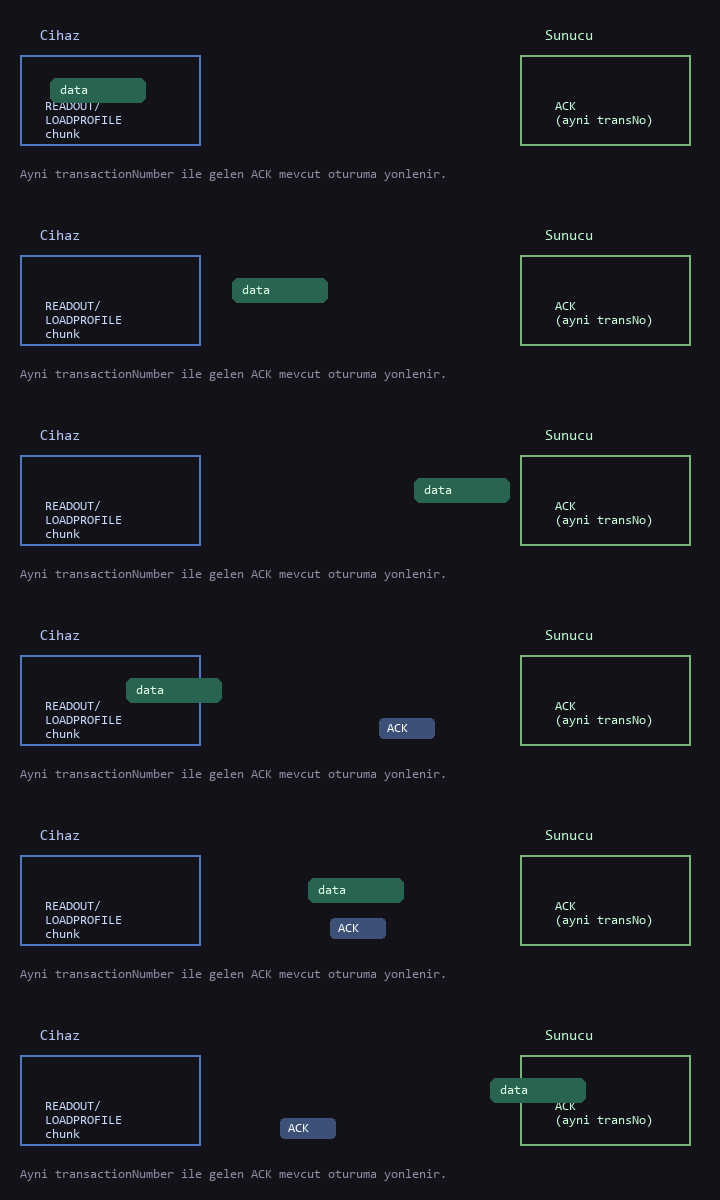
Data push
Readout/profile data and ACK (same transNo)
Dispatch
RX queue β†’ parse β†’ session

1. IDENT Message

DirectionChannelSummary
OutboundPushTRANS + FLAG + SN + FUNC_IDENT + REGISTERED + device info + PULL_IP + PULL_PORT
InboundPushSame TRANS_NUMBER + FUNC_IDENT + REGISTER=true

Device β†’ server (example trans=45, serial=0123456789ABCDE)

$
  00FF 0002 002D                    TRANS_NUMBER = 45
  0001 0003 "AVI"                   FLAG
  0002 000F "0123456789ABCDE"       SERIAL_NUMBER
  0003 0001 01                      FUNCTION = IDENT
  0101 0001 00                      REGISTERED = false
  0102 0003 "AVI"                   DEVICE_BRAND
  0103 0008 "AVIO2622"             DEVICE_MODEL
  0104 0013 "2021-06-02 17:19:58"  DEVICE_DATE
  0105 000C "192.168.1.10"         PULL_IP
  0106 0002 0A3E                    PULL_PORT = 2622
#

Full packet (hex): 2400FF0002002D000100034156490002000F30313233343536373839414243444500030001010101 00010001020003415649010300084156494F3236323201040013323032312D30362D30322031373A31393A35380105000C3139322E3136382E312E3130010600020A3E23

Server β†’ device

$
  00FF 0002 002D                    TRANS_NUMBER = 45 (required)
  0001 0003 "AVI"
  0002 000F "0123456789ABCDE"
  0003 0001 01                      FUNCTION = IDENT
  0107 0001 01                      REGISTER = true
#

2. ALIVE

DirectionChannelSummary
OutboundPushTRANS + header + FUNC_ALIVE + DEVICE_DATE
InboundPushOptional: FUNC_ACK + ACK_STATUS (same TRANS)

Device β†’ server

$
  00FF 0002 00XX                    TRANS_NUMBER
  0001 0003 "AVI"
  0002 000F "0123456789ABCDE"
  0003 0001 02                      FUNCTION = ALIVE
  0104 0013 "2026-03-31 12:00:00"  DEVICE_DATE
#

3. ACK / NACK

DirectionChannelSummary
OutboundPull or pushTRANS + header + FUNC_ACK or NACK + ACK_STATUS

ACK example (trans=45)

$
  00FF 0002 002D
  0001 0003 "AVI"
  0002 000F "0123456789ABCDE"
  0003 0001 03                      FUNCTION = ACK
  0301 0001 01                      ACK_STATUS = true
#

2400FF0002002D000100034156490002000F3031323334353637383941424344450003000103030100010123

4. LOG (Pull Request β†’ Pull Response)

DirectionChannelSummary
Inbound (request)PullServer: FUNC_LOG + TRANS
Outbound (response)PullDevice: FUNC_LOG + PACKET_NUM + STREAM + LOG_DATA (chunked)

Server β†’ device (request)

$
  00FF 0002 00XX                    TRANS_NUMBER
  0001 0003 "AVI"
  0002 000F "0123456789ABCDE"
  0003 0001 05                      FUNCTION = LOG
#

Device β†’ server (first chunk)

$
  00FF 0002 00XX
  0001 0003 "AVI"
  0002 000F "0123456789ABCDE"
  0003 0001 05
  0201 0002 0001                    PACKET_NUM = 1
  0202 0001 01                      PACKET_STREAM = true
  0401 02BC "…700 byte log…"       LOG_DATA
#

5. SETTING

DirectionChannelSummary
InboundPullFUNC_SETTING + optional SERVER_IP/PORT and one or more meter blocks (METER_INDEX separator)
OutboundPullACK or NACK (same TRANS)

Server β†’ device (server address + add-meter example)

$
  00FF 0002 00XX                    TRANS_NUMBER
  0001 0003 "AVI"
  0002 000F "0123456789ABCDE"
  0003 0001 06                      FUNCTION = SETTING
  0601 000D "192.168.1.100"        SERVER_IP
  0602 0002 2212                   SERVER_PORT = 8722
  050B 0001 00                     METER_INDEX = 0
  0501 0003 "add"                  METER_OPERATION
  0502 0008 "IEC62056"             METER_PROTOCOL
  0503 000B "electricity"          METER_TYPE
  0504 0003 "MKL"                  METER_BRAND
  0505 0008 "12345678"             METER_SERIAL_NUM
  0506 0006 "port-1"               METER_SERIAL_PORT
  0507 0004 0000012C               METER_INIT_BAUD = 300
  0508 0001 00                     METER_FIX_BAUD = false
  0509 0003 "7E1"                  METER_FRAME
#

Device β†’ server

$
  00FF 0002 00XX
  0001 0003 "AVI"
  0002 000F "0123456789ABCDE"
  0003 0001 03
  0301 0001 01
#

6. Firmware Update

DirectionChannelSummary
InboundPullFUNC_FW_UPDATE + FW_ADDRESS (ftp://…)
OutboundPullACK, then FTP download

Server β†’ device

$
  00FF 0002 00XX
  0001 0003 "AVI"
  0002 000F "0123456789ABCDE"
  0003 0001 07                      FUNCTION = FW_UPDATE
  0901 002E "ftp://user:pass@192.168.1.50:21/fw/v2.bin"
#

7. READOUT / LOADPROFILE

End-to-End (Summary)
sequenceDiagram
  participant S as Server
  participant Pull as Device pull
  participant O as OrionTLV
  participant M as MeterOps
  participant Push as Device push
  S->>Pull: READOUT / LP + TRANS + parameters
  O->>S: ACK (pull)
  O->>M: readout/profile job
  M-->>O: callback
  O->>Push: data packets (same transNo)
  S->>Push: ACK
              

READOUT Request - Server β†’ Device

$
  00FF 0002 00XX
  0001 0003 "AVI"
  0002 000F "0123456789ABCDE"
  0003 0001 08                      FUNCTION = READOUT
  0703 0012 "ReadoutDirective1"    DIRECTIVE_NAME
  0505 0008 "12345678"             METER_SERIAL_NUM
#

Data Message - Device β†’ Server

$
  00FF 0002 00XX                    same transaction as READOUT request
  0001 0003 "AVI"
  0002 000F "0123456789ABCDE"
  0003 0001 08
  0201 0002 0001
  0202 0001 00
  0701 00..                         METER_ID
  0702 02BC "…"                     READOUT_DATA
#

LOADPROFILE Extra Fields

  0704 0013 "2021-06-22 00:00:00"   START_DATE
  0705 0013 "2021-06-22 12:05:00"   END_DATE

8. DIRECTIVE LIST / ADD / DEL

MessageDirectionKey TLVs
LISTPull β†’ / ←DIRECTIVE_ID; replies use DIRECTIVE_DATA + PACKET_STREAM
ADDPull β†’DIRECTIVE_DATA (JSON)
DELPull β†’DIRECTIVE_ID

LIST - Server β†’ Device

$
  00FF 0002 00XX
  0001 0003 "AVI"
  0002 000F "0123456789ABCDE"
  0003 0001 0A                     FUNCTION = DIRECTIVE_LIST
  0801 0001 "*"                    DIRECTIVE_ID (all)
#

ADD - Server β†’ Device

$
  00FF 0002 00XX
  0003 0001 0B                     FUNCTION = DIRECTIVE_ADD
  0802 00A0 "{...JSON directive...}"
#

DEL - Server β†’ Device

$
  00FF 0002 00XX
  0003 0001 0C                     FUNCTION = DIRECTIVE_DEL
  0801 000F "ReadoutDirective1"   DIRECTIVE_ID
#

9. Push Meter Data

A push connection is established before sending meter data. Payload is then sent in packets up to 1024 bytes. When an ACK arrives from the server with the same transNumber, delivery is confirmed and the session is closed.

Test Server: ProtocolOrionTLV_TestServer.py

Default push port 8723. Listens for push connections; after IDENT, sends pull commands to the reported pull IP/port. Auto-replies echo the TRANS_NUMBER from the incoming packet (IDENT, Alive ACK, READOUT/LP last-chunk ACK).

cd Application\AppZMeterGw\Services\Protocol\Test_Server
python ProtocolOrionTLV_TestServer.py
python ProtocolOrionTLV_TestServer.py 9000

Screenshots - Inbound/Outbound Log (Same Layout as Test Server)

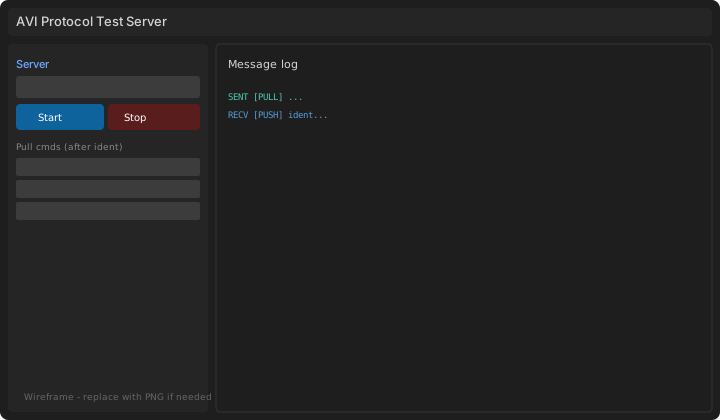
Main window
Main window. Push port, Start/Stop, device fields, auto-reply options, pull commands, message log on the right.
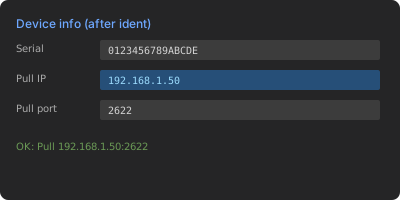
Ident
Ident flow. When the device connects, IDENT is received; pull IP/port are filled in.
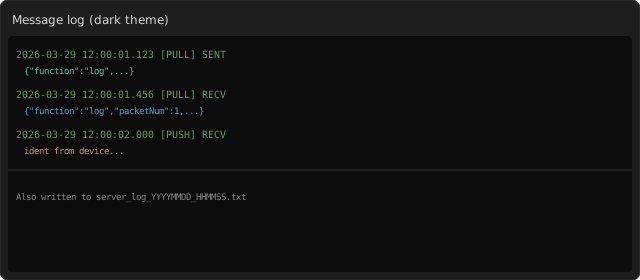
Log
Log panel. ← RECV / β†’ SENT lines, hex and parsed TLV.
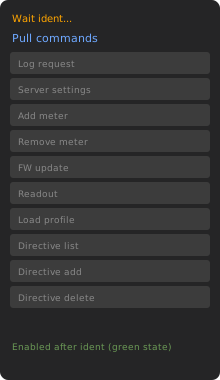
Pull commands
Pull commands. Enabled after ident; each send uses a new TRANS_NUMBER (sequential on port 8723 test server).

Sample Log Table (As Shown in the Panel)

TimeDirChannelSummaryTRANSFUNCTION
14:02:01.1← RECVPUSHDevice IDENT45IDENT
14:02:01.2β†’ SENTPUSHRegistration reply45IDENT + REGISTER
14:05:00.0← RECVPUSHALIVE46ALIVE
14:05:00.1β†’ SENTPUSHACK46ACK
14:10:22.0β†’ SENTPULLREADOUT request1READOUT
14:10:22.2← RECVPULLACK1ACK
14:10:25.0← RECVPUSHReadout data (last chunk)1READOUT
14:10:25.1β†’ SENTPUSHACK1ACK

Public API (AppProtocolOrionTLV.h)

appProtocolOrionTLVInit(serialNumber, serverIP, serverPort, deviceIP, pullPort);
appProtocolOrionTLVStart();
appProtocolOrionTLVStop();
appProtocolOrionTLVPutIncomingMessage(channel, data, dataLength);  /* PUSH_ / PULL_ socket name */
appProtocolOrionTLVSendEvent(ORION_EVENT_ALIVE | ORION_EVENT_FW_UPGRADE_SUCCESS);

Constants: ORION_PACKET_MAX_SIZE 1024, ORION_DATA_CHUNK_SIZE 700, ORION_SESSION_TIMEOUT 10000 ms, ORION_ALIVE_INTERVAL_S 300 s.